
To enhance account security, we have updated our verification method from SMS to email. As part of this change, you will need to re‑register your account details the first time you log in after the update, either through the mobile app or the member portal.
This change improves your account security and makes it easier to access the application while at sea, as you can now receive your verification code over Wi‑Fi instead of relying on cellular service.
If you are experiencing any issues, we have prepared a list of frequently asked questions to help you. If your question is not covered below, or if your matter is urgent, please use our 24/7 chat located in the bottom‑right corner of the website.
I keep receiving a “Member Does Not Exist” error and am unable to complete my registration. What should I do?
Please verify that your name, date of birth, and MBAS ID are correct. If the issue still persists, please contact us via LiveChat if it is urgent or send us an email at mbasmanila@marinebenefits.no, attaching a screenshot of the registration page with your details.
After the update, I am unable to log in to the system. Do I need to register again?
Yes, as part of our ongoing efforts to make our systems more secure, you need to register again. Please note that this is a one-time process only. If you are using the member portal click, Register new member. If using mobile application, simply click Register. Once you have entered your details, you are ready to log in as usual.
How may I update the email address associated with my log-in credentials?
If it is urgent, please use the 24/7 chat located in the bottom right corner of the website. Otherwise, please send an email to mbasmanila@marinebenefits.no with your request. Please be ready to provide identification details.
I have already uninstalled and reinstalled the Marine Benefits mobile application but remain unable to log in. How can I successfully access my account through the mobile app?
If it is urgent, please use the 24/7 chat located in the bottom right corner of the website. Otherwise, please send an email to mbasmanila@marinebenefits.no with your request. Please be ready to provide identification details.
I forgot my password. How can I regain access to my account?
You may regain access by visiting our Member Portal or Mobile App and using the Forgot Password feature. A password reset link will be sent to your registered email address.
How do I check if my registration is successful?
After a successful registration, you will be redirected to the Update Details page or the Home page of the member portal or mobile application.
The registered e-mail with Marine Benefits is my spouses. What do I do?
If your account is registered with your spouse’s email, please use that email the first time you log in. After logging in, you can update the email to your own in the member portal or mobile app.
If you have not created an account before, please create a membership profile. The example below shows how to do this in the member portal, and you can find the mobile app instructions here: https://marinebenefits.no/guide/create-membership-profile/
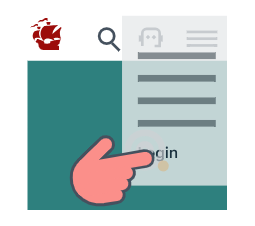
Click Login on our website
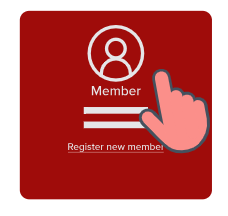
Click Register new member
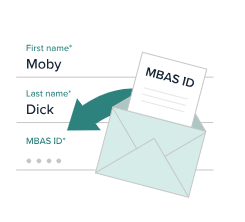
Fill in the form
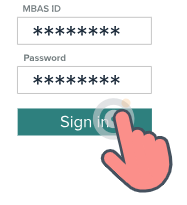
Sign in with MBAS ID
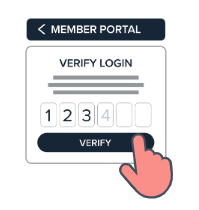
Enter verification code
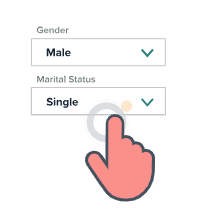
Update your details